Plan your path
On this page
This book holds a core path (Parts II–IX) and five frontier tracks (Parts X–XIV). Most readers follow one main path, often beside a course or a job, and add one or two tracks. Each track’s route chapter plans its own pace as if it had your week to itself; run all four at those paces and they would ask for 23 to 26 hours a week, more than most people sustain for long. This chapter shows how to fit them into one realistic week, what that week buys, and what to do when a week goes wrong.
A. The units of a week#
- A session is 75 minutes and has one shape everywhere in the book: 10 minutes re-solving a logged mistake from memory, 15 minutes on the picture and the idea, 40 minutes of problems or lab steps without help, and 10 minutes to check, find the first wrong step, and log it (LM explains why).
- A build block is three hours on one lab: long enough to get a program or an experiment from a blank file to a measured result.
- A review is 30 minutes once a week with your error log and this plan.
B. A sample week#
The plan below gives the tracks 10 hours a week beside a course or a job, and 16 in a week without one. Before an exam, keep only the algorithms sessions, one AI session, and the review.
| Beside a course or job (10 h) | No course this week (16 h) | Exam week (4.25 h) | |
|---|---|---|---|
| Mon | CP session | CP session; Geometry session | CP session |
| Tue | AI session | AI build block | AI session |
| Wed | Geometry session | CP session; EL block (90 min) | – |
| Thu | – | Geometry session | – |
| Fri | CP session | CP session | CP session |
| Sat | AI build block | AI build block | – |
| Sun | EL block (90 min); review (30 min) | EL block (90 min); review (45 min) | review (30 min) |
Move the days around your fixed commitments and keep the counts: a 75-minute session fits before or after a work shift, and the three-hour build block wants a free half day. With fewer hours, scale every slot down together; with more, scale them up (section C shows what each budget buys).
C. The four tracks on one calendar#
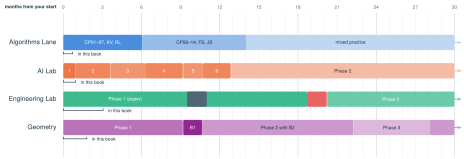
A sample plan at 10 hours a week: two algorithms sessions (2.5 h), an AI build block and session (4.25 h), a 90-minute Engineering block, one Geometry session (1.25 h), and a 30-minute review. Each bar is a track’s full route as its route chapter maps it, placed week by week; the bracket under each bar marks the module this book teaches in full, and an arrow means the route continues past month 30. On the Engineering row, the dark slate block is EL-S (SITL), the software-only simulation lab, and the red block is the safety gate EL06; on the Geometry row, the dark purple block is bridge B1. Months count from your first week and assume steady weeks, with no allowance for holidays or exam weeks.
What the sample plan says:
- Algorithms Lane: two sessions a week, every week. CP01, taught in this book, by month 1; the first seven modules (with builds KV and RL) by month 7; all fourteen modules by month 15. After that the two sessions continue as mixed practice.
- AI Lab: the largest slot. Module 1, autograd from scratch, by month 1; Module 2, a GPT of your own, by month 4; Phase 1 (Modules 1–6) by month 13.
- Engineering Lab: one 90-minute block a week. EL01 by month 4; Phase 1 and its Concept Design Review by month 19; the safety gate (EL06), which comes before any hardware, by month 21.
- Geometry: one session a week. GEO01 by month 2; Phase 1 and bridge B1 by month 11.
What more hours buy. The same plan at other budgets (every slot scaled together), and once with the Engineering Lab leading instead of the AI Lab:
| Hours a week on the tracks, AI Lab leading | EL leading | ||||
|---|---|---|---|---|---|
| Milestone (finished by) | 6 | 10 | 15 | 20 | 10 |
| Algorithms Lane, CP01 (in this book) | month 2 | month 1 | month 1 | month 1 | month 1 |
| Algorithms Lane, first seven modules | month 11 | month 7 | month 5 | month 4 | month 7 |
| Algorithms Lane, all 14 modules | month 24 | month 15 | month 10 | month 8 | month 15 |
| AI Lab Module 1 (in this book) | month 2 | month 1 | month 1 | month 1 | month 3 |
| AI Lab Module 2, a GPT of your own | month 7 | month 4 | month 3 | month 2 | month 11 |
| AI Lab Phase 1 (Modules 1–6) | month 22 | month 13 | month 9 | month 7 | after month 30 |
| Engineering Lab EL01 (in this book) | month 6 | month 4 | month 3 | month 2 | month 2 |
| Engineering Lab Phase 1 | after month 30 | month 19 | month 13 | month 10 | month 7 |
| Engineering Lab safety gate | after month 30 | month 21 | month 14 | month 11 | month 7 |
| Geometry GEO01 (in this book) | month 4 | month 2 | month 2 | month 1 | month 2 |
| Geometry Phase 1 and bridge B1 | month 18 | month 11 | month 8 | month 6 | month 11 |
Every extra hour helps the slow tracks most: at 15 hours, AI Lab Phase 1 moves from month 13 to month 9, and Engineering Phase 1 from month 19 to month 13. Leading with the Engineering Lab reaches its safety gate by month 7, but AI Lab Phase 1 then finishes after month 30. Neither choice is wrong; choose the track whose work you most want to show first.
D. When the week goes wrong#
- Your course or job comes first. In an exam week, switch to the exam-week column.
- Algorithms never drop below two sessions a week. Algorithms and code reading fade fastest without practice, and coding screens test them alone and under a clock.
- A short week: drop Geometry first, then the Engineering block, then the AI session (keep the build block). Never drop the two algorithms sessions or the review.
- A failed gate adds time. Never skip a mastery gate to stay on the calendar; the calendar moves instead.
- Re-plan monthly. Compare the hours your logs record with this plan and adjust the slots. The plan is an estimate until your own hours replace it.
- If a coding assessment arrives, use CP00’s ten-day emergency kit, paid for with the AI and Engineering hours of those ten days.
E. Where the parts and tracks depend on each other#
| This must come first | Before, or because |
|---|---|
| Modules 08–11 (the derivative, the chain rule, and implicit differentiation) | AI01, autograd from scratch, which is the chain rule run backward through a graph. |
| C01–C02 (programs as state changes) | CP01, and the labs of the frontier tracks. |
| Geometry B1, then B2 | EL10 and EL11 (tolerances and drawings, then industry CAD). |
| EL18 (rotations and frames) | Geometry B3, which builds on it, and then B4. |
| WSL2, installed in AI Lab Module 3 | EL-S, the simulation lab, and later EL23, which reuse it. |
| Linear algebra: A01–A02 and W06 | EL18; A02’s eigenvalues again for EL21 (state space and LQR). |
| Probability: A03–A04 and G04 | EL22 (the Kalman filter). |
| F01’s PID and Module 13’s linearization | EL20 (rate and attitude control). |
The AI Lab needs no course first: each of its modules teaches the mathematics it uses just in time, and A01–A04 give the depth (AI00, section I). GEO00 lets B4’s first half (orientation, intersection, area, the convex hull) run right after GEO05; take it then if you want it ready when the lane’s CP14 meets it.
F. Decisions only you can make#
- Your weekly hours beyond your main path. A plan you keep beats a bigger one you drop: start at a budget you are sure of, log real hours for four weeks, then choose.
- Which build track leads. The sample plan leads with the AI Lab, whose first modules build Python, PyTorch, and programs you can show without buying hardware. Lead with the Engineering Lab if building physical systems is what you most want; its hardware phases also need a budget you set before any purchase (EL00).
- One home for algorithms. AI Lab Module 3 has a 25-hour quick tour (section 3C) of a toolkit the Algorithms Lane teaches in more depth. If you start Module 3 before the lane reaches its graph, greedy, and dynamic-programming modules (CP10–CP13), keep the tour and let the lane be the deeper second pass. If the lane is already past CP13, shrink 3C to about 6 hours (union-find, Dijkstra’s algorithm, and a short review): Module 3 then takes about 30 hours instead of 49.
- Courses to take beside the book. If you are choosing courses, take linear algebra early, beside or before multivariable calculus. With probability and statistics, it opens the most of the AI and Engineering tracks soonest (section E).
G. How this plan was made#
The sample plan is a week-by-week simulation. Each week’s hours are split into the slots above, and each track works through its modules in order, using the hours its route chapter gives each module (CP00 section D, AI00 sections C and K, EL00 sections D and E, GEO00 section E). A track that is finished or blocked passes its hours on (Algorithms to Geometry, AI to Engineering, Engineering to Geometry, Geometry to AI). A module whose prerequisite is unfinished waits: EL10 and EL11 hold up the Engineering Lab until bridges B1 and B2 are done, while bridges B3 and B4 (waiting for EL18) and EL-S (waiting for AI Lab Module 3) are set aside so that their tracks continue. A module already under way always finishes before another starts. Module hours are the route chapters’ estimates, and the weeks are steady; your own logged hours are the only real calendar.