CP00: The Algorithms Lane: fourteen modules, four builds, one habit
On this page
- Prerequisites and observable goals
- A. The lane on one page
- B. Why this lane, honestly
- C. What the screens look like
- D. The modules
- E. How every module runs
- F. The mastery ladder
- G. Rhythm and an honest calendar
- H. The emergency kit
- Sources for this chapter (checked 15 October 2026; rechecked 17 October 2026)
Prerequisites and observable goals#
A first program or two in C++: a for loop, std::vector<int>, and a function that returns a value. Read this chapter first, then start CP01.
Describe the lane’s three lines and four level-up builds, say what each module teaches and what you build in it, name the two different skills that coding screens test, place yourself on the six-level mastery ladder for any pattern, plan a week of practice, and know what to do if an assessment arrives before you are ready.
Level: Algorithms Lane, the route. About 150 hours for the core lane at two to five sessions a week; Plan your path, at the front of the book, fits it beside the other tracks. Advanced interview preparation is planned for F17, a later Frontier chapter that this book does not include.
A. The lane on one page#
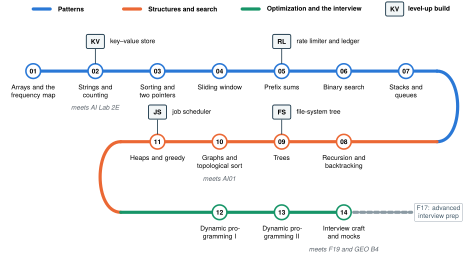
Picture CP00.1. The lane as a transit map. Three lines, fourteen stations, one per module, ridden in order. The squares are level-up builds: timed projects that start small and gain features in stages, the second skill coding screens test. Grey notes mark where other tracks meet the lane: CP02 (AI Lab Module 2E’s byte-pair encoding counts pairs), CP10 (AI01’s topological sort, again), and CP14 (F19’s performance work and the Geometry track’s bridge B4, geometry in code).
B. Why this lane, honestly#
Algorithms are the craft under every program you will write: choosing the data structure, knowing what a loop promises, and knowing what a design will cost before you build it. They are also what every employer in F00 screens for, with code written alone and under a clock: SpaceX, Tesla, Anthropic, OpenAI, and the drone and autonomy companies. Their loops weigh three things most: coding (data structures and algorithms), depth in C++ and systems, and system design. Whether or not you are interviewing, the lane is for mastery, for the programs you build, and for whichever day you choose to interview. Calculus matters; this matters more at the keyboard.
The first misses are predictable. Four are common in a beginner’s first sessions:
- Calling
.size()on anint: the type of a name was not checked. - Starting
largestat : the loop’s promise was false before it began. - Using one counter where the return type demanded a map: the signature was not read as the plan.
- Naming the wrong key type for a map in code someone else wrote: a type was guessed instead of looked up.
The gap is not intelligence or effort; it is a small set of habits: read types first, state what a loop promises, and let the signature tell you what to build. CP01 drills exactly those, and every later module leans on them. If you already build larger programs, two strengths transfer, debugging by evidence and thinking in tests; the lane turns them into fluent, unaided problem solving.
C. What the screens look like#
Companies do not publish their exact processes, and they change them. The descriptions below come from candidate reports and commercial preparation guides, not from the companies, so treat them as patterns rather than promises, and confirm the current format with your recruiter.
- SpaceX (software roles): candidates describe a recruiter call, then routing to one of several teams, each with its own assessment: a 45- to 60-minute CoderPad screen with a LeetCode-medium problem and questions on testing and edge cases, or a timed take-home of about 4 hours framed as a practical problem (one 2024 report: connecting satellites to users), graded on correctness, test coverage, complexity, and style. An onsite of four to six rounds follows, including system design, and some full-time candidates report a 30- to 60-minute presentation of past work to a panel.
- Anthropic (software engineering): Anthropic confirms it uses CodeSignal and Colab and that candidates may look things up, but it does not publish the format. Candidate reports describe a timed assessment of about 90 minutes built as one project in progressive levels, for example a small in-memory database that gains features at each level, where clean, fast, correct implementation matters more than clever algorithms; most say four levels, and one coach reported six stages with hidden later requirements from June 2026 (unconfirmed). Later rounds mix coding and system design. Some guides report that the language is set by the role and is often Python; the patterns in this lane carry straight over to the Python the AI Lab teaches. Anthropic’s own guidance is explicit about AI: take-home assessments are done “without Claude unless we indicate otherwise”, and live interviews with no AI assistance unless it says otherwise.
- Interviews with AI in the room. Since 2025 some employers test how well you work with an assistant. Meta confirmed in July 2025 that it was testing coding interviews with an AI assistant, and Google began piloting AI-assisted coding interviews with Gemini for junior and mid-level US roles around May 2026, along with a round in which candidates read, debug, and optimize an existing codebase. These rounds grade how you check the assistant’s output and how you read code you did not write. Anthropic’s screens stay AI-free by default, and OpenAI’s policy reportedly varies by team.
Whatever the level count turns out to be, the safe training target for a progressive build is about 90 minutes, done without AI, with a data model designed for change. Two different skills follow, and the lane trains both:
- Pattern problems. Recognize which known technique fits an unfamiliar problem, implement it correctly, and explain its cost. The fourteen modules build this.
- Build and extend. Write a small working system quickly, then add features without breaking what works, under a clock. The four level-up builds train this, and it rewards engineering habits as much as algorithm knowledge.
D. The modules#
This book teaches CP01 in full. The table maps the rest of the route: what each module teaches, what you build in it, and its hours.
| Module | Title | Patterns, and what you build | Hours |
|---|---|---|---|
| CP01 | Arrays, loops, and the frequency map | Read types first; accumulators and their invariants; hash maps for counting and for remembering what you have seen. Count, most frequent, first unique, anagrams, two-sum, overflow-safe sums | 8 |
| CP02 | Strings and counting | Counting arrays versus maps; anagram groups; palindromes; run-length encoding; counting adjacent pairs (the heart of byte-pair encoding) | 8 |
| KV | Build: a key–value store | Four levels in 90 minutes: set and get; delete and counts; prefix scans; history and undo | 6 |
| CP03 | Sorting and two pointers | Sort, then scan; pairs and triples that sum to a target; merging; removing duplicates in place | 8 |
| CP04 | Sliding window | Fixed and variable windows kept valid by an invariant; longest and shortest windows | 7 |
| CP05 | Prefix sums | Running totals, range queries in constant time, subarray sums with a map, difference arrays | 7 |
| RL | Build: a rate limiter and a ledger | Timestamps, windows, and balances, extended level by level | 6 |
| CP06 | Binary search | Searching sorted data, lower and upper bounds, and searching on the answer | 8 |
| CP07 | Stacks and queues | Matching brackets, the monotonic stack, double-ended queues, sliding maximum | 8 |
| CP08 | Recursion and backtracking | Call trees, subsets, permutations, pruning | 10 |
| CP09 | Trees | Traversals, level order, recursion on trees, binary search trees | 10 |
| FS | Build: a file-system tree | Paths, sizes, moves, and queries on a tree you maintain | 6 |
| CP10 | Graphs | Adjacency lists, breadth-first shortest paths on grids, depth-first search, components, topological sort, cycle detection | 12 |
| CP11 | Heaps and greedy | Priority queues, top-, intervals, and proving a greedy choice by an exchange argument | 9 |
| JS | Build: a job scheduler | Priorities and dependencies: a heap and a topological order working together | 6 |
| CP12 | Dynamic programming I | States and transitions, memoization versus tables, one-dimensional problems | 12 |
| CP13 | Dynamic programming II | Two-dimensional tables: knapsack, edit distance, longest common subsequence, grid paths | 12 |
| CP14 | Interview craft and mock assessments | Clarifying questions, testing out loud, talking about cost, managing the clock; two timed mock assessments, one build-and-extend mock without AI, and one AI-allowed mock on a codebase you did not write | 10 |
| Total | 153 |
Where the rest of the book meets the lane: C06–C08 and G03 treat the same structures with proofs, for depth after each module; AI01’s topological sort returns in CP10; AI Lab Module 2E’s byte-pair encoding is a CP02 counting problem; the Geometry track’s bridge B4 puts geometry into code; and F19 measures what your code does on real hardware.
E. How every module runs#
Every module follows the AI Lab’s format, tuned for code:
- Spaced review. Two or three questions from due entries in your error log, answered from memory. Keep the log as a spreadsheet or CSV file with one row per miss: the module, the first wrong step, the corrected rule, and the date to review it.
- Picture first. The mechanism drawn: memory boxes and an index cursor, a tally board, two pointers closing in, a window sliding, a tree of calls.
- Deep explanation, one idea at a time, with the invariant that makes each pattern correct, its cost, and a field guide of the bugs beginners actually write.
- The lab. Steps go from worked (shown in full) to partly filled (blanks) to solo (a specification plus tests). You type every line. A “Predict first” box comes before every run, and every step you write yourself has a three-rung hint ladder, collected on pages of their own after the practice set; rung 3 is a skeleton, never the answer.
- Practice on paper: traces, predictions, bug hunts, and cost estimates, all with complete solutions.
- Code reading from real code (CP01 reads a real-time game engine’s server), with your explanation written before you read the solution.
- Mastery gate: unseen problems, closed book, timed, with checks provided. You move on when it passes.
- Development log: a plain text file beside your code, one entry per module: what you built, your timings, your costliest bug.
- Stretch work, clearly marked.
Two names come from music: a chord chart is a one-card syntax reference for the C++ a module uses, and scales are short graded drills you repeat until they are automatic, the way a musician practises.
Your toolkit. A C++20 compiler: the labs use clang++, the one that comes with Visual Studio on Windows, or any clang++ on your PATH. Each module’s folder in the companion code (cp/cp01 for CP01) holds drills.h (what you write), check.cpp (the tests, which you do not edit), bench.cpp (the benchmark), a gate folder for the mastery gate, and run.ps1, which compiles with warnings on and runs the checks; .\run.ps1 3 runs only step 3. Without PowerShell, run the same build yourself: clang++ -std=c++20 -O2 -Wall -Wextra -Wshadow -Wno-unused-parameter -o check check.cpp, then ./check 3. The labs ship with starters, checks, and benchmarks, not answers: each module ends with complete solutions, to compare with after your own attempt has run against the checks.
AI and this lane. The lane follows the book’s AI-use policy (LM, section I). Red, no AI: every first attempt, every gate, every timed build, every contest. Amber, after a logged attempt: an assistant may explain, review, and suggest variants, but never debug your code for you, because debugging is the skill controlled trials show AI use erodes most. Green: chores such as stress-test generators, visualizers, and plots. The gates are always closed book.
F. The mastery ladder#
AI00’s six-level ladder, applied to one algorithm pattern:
| Level | You can | Evidence |
|---|---|---|
| 1. Reproduce | Retype a worked solution and make the checks pass | The lab’s worked steps |
| 2. Explain | Trace it by hand on a new input; state its invariant and its cost | A trace table and a sentence you could say aloud |
| 3. Modify | Change it for a variant: all pairs instead of one, duplicates, a different output | The partly filled steps |
| 4. Measure | Predict and then measure its speed against the brute force | A timing table in your development log |
| 5. Extend | Solve an unseen problem in the same pattern, alone, under the clock | The mastery gate |
| 6. Invent | Spot the pattern in an unlabelled problem, or combine two, and argue it is correct | Mixed sets from CP07 on, and CP14’s mocks |
A module’s gate asks for level 5 on its own patterns. Level 6 grows across modules: from CP07 on, practice sets stop telling you which pattern applies.
G. Rhythm and an honest calendar#
A session (75 minutes): 10 minutes re-solving a logged miss from memory; 15 minutes on the picture and the idea; 40 minutes of lab steps or problems; 10 minutes to check, find the first wrong line, and log it.
A week: two sessions beside a course or a job, three in a week without one. Never fewer than two. Plan your path, at the front of the book, shows how that fits beside the other tracks.
The arithmetic. The core lane is about 153 hours. At 2.5 hours a week (two 75-minute sessions) that is about 60 weeks; at 5 hours a week, about 30. The interview core, CP01 through CP07 with builds KV and RL, is about 66 hours: roughly 26 weeks at two sessions a week, or about 13 weeks at 5 hours a week. These are estimates, not promises: record your real hours in your development log and revise the plan against them.
The risk call. If you are applying for jobs, or start to, an assessment can arrive within weeks of an application, before the lane is far along. If one does, use the emergency kit below, and lean on what you can already show: the projects you have built and the habit of testing everything.
H. The emergency kit#
If an assessment arrives before you reach CP06, spend ten days like this, then come back to the lane in order.
| Day | Work |
|---|---|
| 1–2 | CP01’s lab and gate: types, accumulators, frequency maps, two-sum |
| 3 | Two pointers on sorted arrays (CP03’s picture and first two steps) |
| 4 | Sliding window (CP04’s picture and first two steps) |
| 5 | Breadth-first search on a grid (CP10’s first step) |
| 6 | Binary search with bounds (CP06’s first step) |
| 7 | One timed mock: three problems in 60 minutes |
| 8–9 | Redo every miss from memory; log each one |
| 10 | Rest; a light warm-up only |
In the room: read every problem before starting; solve the easiest first; write a plain brute force that passes the small examples before optimizing; test the edges (empty input, one element, duplicates, negatives, the largest values) before you submit; and say your plan and its cost aloud in live rounds.
Sources for this chapter (checked 15 October 2026; rechecked 17 October 2026)#
- SpaceX candidate reports, Glassdoor interview reviews (SpaceX, software engineer and intern, 2016–2025, including a September 2022 report of three LeetCode-style questions and a 2024 report of a satellite-to-user take-home), and the commercial guides “SpaceX’s interview process (2026)” (TechPrep) and “SpaceX software engineer interview 2026” (Zero G Talent, February 2026, zerogtalent.com/blog/spacex-software-engineer-interview-2026). Anecdotal; not confirmed by SpaceX.
- Anthropic’s interview format: Anthropic Careers (CodeSignal and Colab; looking things up is allowed), www.anthropic.com/careers; candidate guides from Interview Query, interviewing.io, IGotAnOffer, and TechPrep; a coach’s report of six stages (June 2026), deepsunai.substack.com/p/anthropics-codesignal-assessment. Guides and reports, not confirmed by Anthropic.
- Anthropic’s AI rule, from Anthropic: “How to collaborate with Claude during our hiring process” (Guidance on candidates’ AI usage), updated 10 July 2025, www.anthropic.com/candidate-ai-guidance.
- AI-assisted interviews: Google’s pilot, reported by Business Insider and summarized by Exponent (May 2026), customcareer.miami.edu/blog/2026/05/14/googles-ai-assisted-coding-interview-2026-guide/; Meta’s test, Business Insider (July 2025), www.businessinsider.nl/meta-will-let-some-job-candidates-use-ai-in-their-coding-interviews/.